How to Fact-Check a WhatsApp Forward Before Sharing It in Singapore
The Wrong Assumption About WhatsApp Forwards
A forwarded message carries no guarantee about its original source. WhatsApp strips the metadata that would tell you who first wrote it. What you see is a note that has been passed through an unknown number of hands. The label at the top of the message is your first and most important clue. If you see the words “forwarded as received,” the person who sent it to you did not write it. They copied it from somewhere or someone else. That label is the start of how to fact-check a WhatsApp forward in Singapore. It is the single most reliable signal you get for free. Every other step assumes you have started with that label.
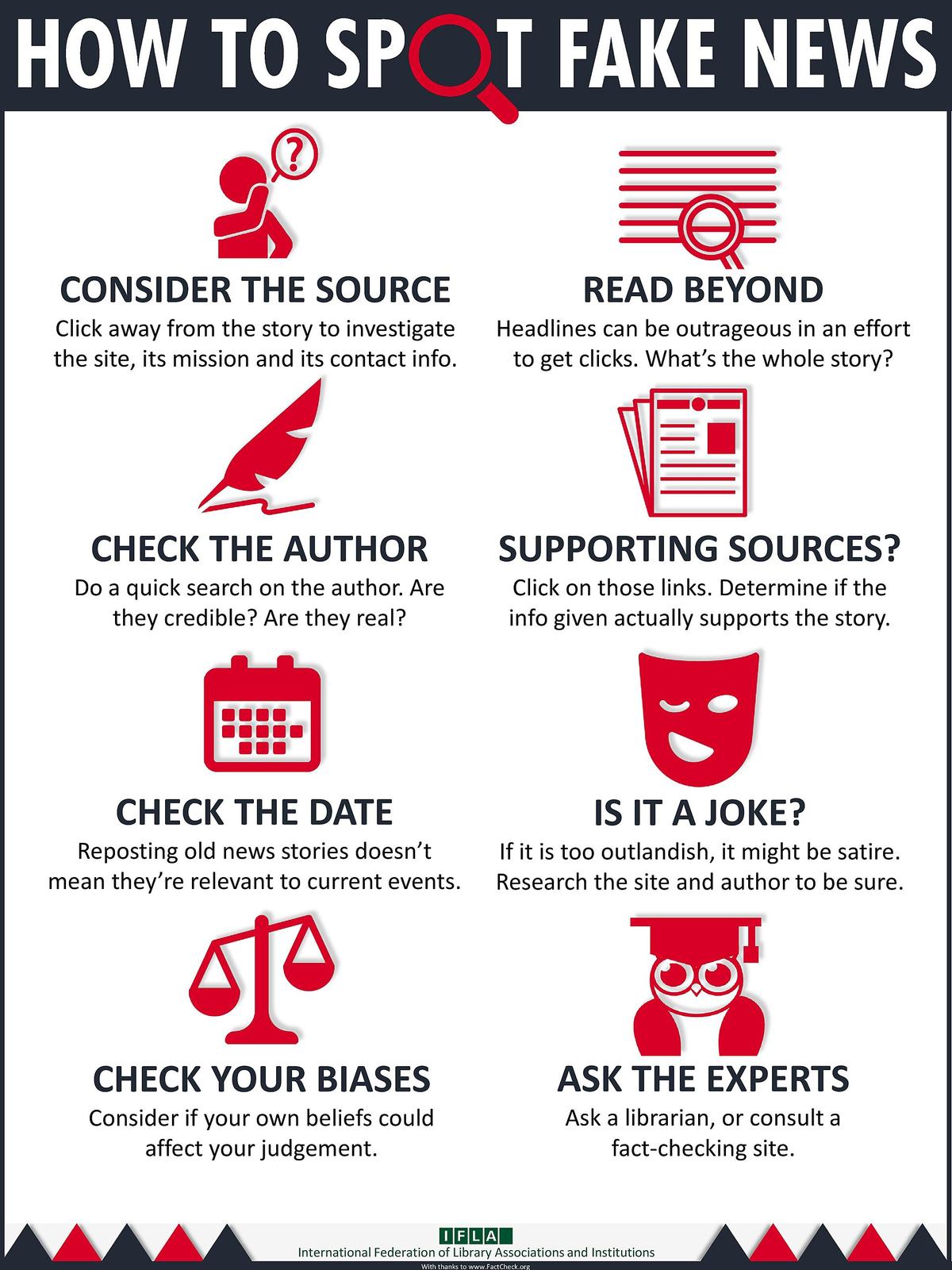
Step 1: Read the Forwarded Label and the Double Arrow
Open the message and look at the top of the chat bubble. WhatsApp shows one of two labels. The first is “forwarded,” with a single arrow icon. The second is “forwarded many times,” with a double arrow icon. That second label means the note has been forwarded through a chain of five or more chats. WhatsApp has shown this label since 2019. The platform also limits how many chats you can forward a note to at once. If a message has been forwarded many times, you can only send it to one chat at a time. That limit exists to slow the spread of viral falsehoods. When you see the double arrow, your checking speed needs to increase. The note has already travelled far. You are not the first person to consider it, and you will not be the last. The label is structural. It will persist in some form, no matter what changes WhatsApp makes to its interface.
Step 2: Do Not Forward Yet, Break the Chain
The most common failure in family group chats is forwarding before checking. Someone passes on a claim with the comment “is this true?” and sends it out anyway. That action amplifies the falsehood before anyone has answered. The note has already reached everyone in the group. The damage is done. Break the chain. Do not forward the note to anyone else until you have checked it. If you are in a group chat, do not even forward it to the sender for checking. You have the note open on your phone. You have the tools to check it. The rule is simple: check first, never forward without checking. When you do check and find the note is false, tell the sender privately. Then delete the false note if you can. The effort is low. It costs you thirty seconds to check. It costs the group hours of confusion if you do not.
Step 3: Use Lateral Reading to Find the Original Source
Now that you have decided not to forward, open your web browser. The technique is called lateral reading. Leave the note itself and open new tabs to check the source, the claims, and the context. Do not stay on the WhatsApp screen. Copy a distinctive phrase from the note. Paste it into a search engine. Add the word “Singapore” or “SCAM” to the search terms. The results will tell you if anyone has already debunked it. If you find a fact-check article, read it. If you do not find one, the note may be too new or too obscure. That is when you move to the dedicated tools. The goal is source transparency. You want to know who originally wrote the note, not who sent it to you. A trusted friend who forwards a false note is not a source. They are a vector. The original source is a scammer, a prankster, or a well-meaning person who was themselves misled. Lateral reading is the only way to find that original source.
Step 4: Reverse Image Search for Photos and Screenshots
If the forwarded note contains an image or a video still, do not trust your eyes. Generative AI tools can create photorealistic images that have never existed. The visual tells change with every model update. What looks like a blurry hand or a misshapen ear today may be indistinguishable from a real photograph tomorrow. The reliable method is to check where the image has appeared before. Use a reverse image search. Singapore fact-checkers recommend three tools: Google Lens, TinEye, and Yandex Images. Each works slightly differently. Google Lens is the easiest on a phone. TinEye is better at finding modified versions of an image. Yandex is stronger at finding the earliest known use of a photo. The principle is the same: you are checking whether this image has appeared before in a different context. A photo of a flooded MRT station may be real, but from 2011. A photo of a crowd at an event may be real, but taken in another country. A reverse image search gives you the history. That history is your context check.
Step 5: Check Factually, the Government Clarification Portal
If the note makes a claim about a policy, a public health advisory, or an official statistic, go directly to Factually. It is operated by the Ministry of Digital Development and Information. Factually publishes clarifications on false claims circulating locally. Articles appear in English, Chinese, and Malay. Updates are frequent during a crisis, slower during normal periods. When you land on the Factually page, search for a keyword from the note. If you find an article addressing the claim, read the entire piece. The verdict is at the end. Do not stop at the headline. The article will name the original source of the falsehood and show the evidence chain. That is the source transparency you need. If you cannot find the claim on Factually, the note may still be false, but it has not yet been addressed. That is when you move to the independent fact-checkers.
Step 6: Verify with Black Dot Research via the CheckMate Chatbot
The most useful independent resource for a suspicious forward is the CheckMate chatbot. It is operated by Black Dot Research, a Singapore-based fact-checking organisation. Black Dot Research is a signatory to the International Fact-Checking Network code of principles. It receives funding from the Ministry of Digital Development and Information. Here is how it works. Open WhatsApp on your phone. Add the CheckMate number: +65 8518 5967. Send the suspicious note or a screenshot of it to that number. The chatbot will respond, often within minutes, with a fact-check if one exists. If the claim is new, the chatbot will tell you it is looking into it. This is the fastest way to get a verdict from a human fact-checker. The checking speed is measured in hours, not days. The effort is minimal: you are already in WhatsApp, the note is already open, and the contact is saved. This single step replaces hours of searching on your own.
Step 7: Get a Second Opinion with the Sure Anot Chatbot
If CheckMate does not return a result, or if you want a second opinion, use the Sure Anot chatbot. It is operated by SureBears, a separate fact-checking initiative. Sure Anot launched in 2024 and runs on WhatsApp at +65 8893 4722. It is a newer service with a smaller archive, but it works as a cross-check. The principle here is not to settle for a single source. You are looking for a second independent check. Send the same note to Sure Anot. If both CheckMate and Sure Anot say the claim is false, you can be confident in that verdict. If they disagree, do more research. The failure to avoid is over-trusting any one tool. No chatbot is infallible. The verdict is only as good as the evidence behind it. Read the reasoning, not just the conclusion. A verdict without reasoning does not build your own skill. You want to learn why the claim is false, not just that it is false.
Step 8: Use ScamShield for Reported Scam Numbers
If the note looks like a scam rather than a false rumour, switch to ScamShield. It is the Singapore app that blocks scam calls and SMS messages. It also lets you report numbers. The app runs on a known-scam database maintained by the authorities. It is not a general antivirus product. It will not protect you from every threat, but it will warn you about numbers that have already been reported. Since 2024, ScamShield has also operated a WhatsApp bot. That bot lets you check a number before you call it or send money to it. The ScamShield WhatsApp bot is the fastest way to test a suspicious number. It uses the same database as the app. If the number is flagged, you have your answer. The Singapore Police Force also operates a scam reporting WhatsApp number at +65 7099 0000. That line is for reporting scams, not for checking them. Use ScamShield first for a quick check, and the police line second if you have lost money or shared personal data.
Step 9: Know the Common Scam Types in Singapore
Now that you have the tools, you need to know what you are looking for. The Singapore Police Force publishes an annual Scams and Cybercrime Brief. The exact figure changes every year, and the SPF publishes the real number. What does not change is the typology. The most common WhatsApp scam type in Singapore is the impersonation scam. That is when the scammer pretends to be a bank officer, a family member, or someone from an agency. The second most common is the phishing link disguised as a delivery or banking notice. The third is the fake job offer. The fourth is the investment scam group chat. When you see a note that matches one of these patterns, your alarm bells should ring. The patterns are durable because they work. The specific wording changes daily, but the structure does not. Learning the typology is the fastest way to spot a scam before you have even run a fact-check.
Step 10: Check the Date and Location, the Context Trap
A common way false information goes viral is through recirculation. An old news story, a years-old photo, or an outdated advisory gets reposted as if it were new. The claims are often true, but they are not current. The context has changed. Your job is to check the date and the location. Look for a timestamp on the note. If the note claims a road is closed or a mall is flooded, check the date on the news article or the advisory. If the article is from last year, the note is recycling old content. The failure here is correction blindness. People see the image, recognise it as real, and share it without checking whether it is current. The reverse image search from earlier is your best defence. It tells you when the image first appeared. Combine that with a simple search of the claim plus the word “Singapore” and “today” or “2025”. If nothing recent comes up, the note is stale. Do not forward it.
Step 11: Verify the Officialdom Halo, the .gov.sg Trap
Scammers and hoaxers love official logos. A note that appears to come from an agency, the police, or a bank carries psychological weight. The term is the officialdom halo. The note uses a logo, an official-sounding phrase, or a URL that looks like a .gov.sg address. The halo makes you want to believe it. Do not. The communication channel is what matters, not the logo. A genuine agency communication will come from a verified WhatsApp Business account, a website with a .gov.sg URL, or a channel you have subscribed to yourself. It will not come as a forwarded note from your aunt. It will not use a random number with a +65 prefix. When you see a logo from an agency, your checking speed should increase, not decrease. The most reliable check is to go directly to the real website. Type the URL yourself. Do not click the link in the note. This is the single most important habit for avoiding phishing.
Step 12: Understand POFMA and What It Does Not Do
Singapore has a specific law that addresses falsehoods: the Protection from Online Falsehoods and Manipulation Act, or POFMA. POFMA is not a fact-checking service. It is a law that allows the authorities to issue correction directions. A POFMA direction is not the same as a fact-check article. A fact-check article explains why a claim is false. A POFMA direction requires the original poster to publish a correction. The distinction matters for your checking. If you see a note that has been the subject of a POFMA direction, it is a strong signal that the claim is false. But you do not need to wait for POFMA to act. You can check Factually, Black Dot, or the news. If you believe a note you have received falls under POFMA, you can report it to the POFMA Office. The Singapore Police Force Anti-Scam Command investigates the criminal side. For the fastest resolution, report the scam to the SPF at the number you saved earlier.
Step 13: The Social Friction, How to Tell Your Uncle He Is Wrong
You have checked the note. It is false. Now you have to tell the person who sent it to you. This is the hardest step. The social friction is real. A person who shared a false note did not do so out of malice. They did it out of concern, or fear, or a desire to be helpful. Your job is not to shame them. Your job is to correct the record without breaking the relationship. The research suggests a few approaches. First, use a private message rather than a public reply in the group chat. Nobody likes to be corrected in front of their family. Second, do not say “you are wrong.” Say “I checked this on Factually and it is not true.” That gives the person a face-saving out. Third, share the fact-check article itself as your evidence. The article is the argument. You do not need to make one. Finally, thank them for sharing it so you could check. This turns a moment of embarrassment into a moment of collaboration. The goal is to keep the conversational door open. The next time they receive a suspicious note, they might check with you first.
Step 14: When to Report to the Police and How
Most false forwards are annoying but harmless. Some are not. If a note asks for money, requests your bank details, or impersonates an official, it is a crime. Report it. The Singapore Police Force has a dedicated Anti-Scam Command. Reach them through the SPF website, the police hotline, or the WhatsApp reporting number at +65 7099 0000. When you report, have the phone number, the screenshot, and the date. The police will ask for the specific scam typology. That is where your earlier knowledge comes in. Is this a phishing scam, an impersonation scam, or a job scam? Be precise. The reporting process is different from platform reporting. When you report a note on WhatsApp to the platform, you are asking them to enforce their terms of service. That handles content moderation. When you report to the police, you are initiating a legal process under Singapore law. Both are valid. For a scam that involves a financial loss, the police report is the one that matters. The platform report will not recover your money.
Step 15: The Final Habit, Two-Step Verification and Channel Audits
Lock Down Your Account
Before you close the app, spend thirty seconds on prevention. Open WhatsApp settings and turn on two-step verification. It is under Settings, then Account, then Two-step verification. This adds a PIN that prevents someone from hijacking your account. It is the single most effective security measure for WhatsApp.
Audit the Channels You Follow
A reliable source is a channel you have subscribed to yourself. The Gov.sg WhatsApp channel posts policy announcements and advisories, not individual fact-checks. The Straits Times has a WhatsApp channel for news alerts. CNA has one too. These channels are reliable because you control the subscription. A forward that claims to be from a news outlet but arrives from an unknown number is not from that outlet.
Trust Your Discomfort
The final habit is the most important. When you see a note that feels true, that makes you angry or hopeful, that confirms what you already believed, that is exactly when you should stop and check. The emotional override is the strongest force in misinformation. It is the one that makes you share before you think.
How to Fact-Check a WhatsApp Forward When You Are in a Hurry
You have now read the complete process. But you are in a hurry. The family chat is blowing up, and you have thirty seconds. This is the abbreviated version. Look at the top of the note. Is it forwarded? Yes. Is the sender unknown? Yes. Does the note ask you to do something urgent, like pay a fine or verify your bank account? Yes. Then it is a scam. The urgency is the tell. Scammers create urgency to stop you from thinking. They want you to act before you check. The fastest check is to send the note to CheckMate. It takes ten seconds. If you do not have the contact saved, add it now. The second fastest check is to search the first sentence of the note in your browser. The third is to use Google Lens on any image. These three actions take less than a minute. The trade-off is effort versus checking speed. The more you practice, the faster you get. The habit of checking before sharing is more important than any single tool.
The Limits of What This Covers and Where to Go Next
This covers the steps you can take on your phone today. It does not cover the underlying legal framework beyond what you need to know. It does not analyse Singapores content moderation laws, the specifics of the Platform Code of Practice, or the internal policies of each messaging app. If you want the full picture of how Singapore regulates online falsehoods, read the statute and the accompanying white papers. You also need to check the current statistics. The scam figures cited are from the SPFs 2024 annual brief. The 2025 figure will be different. The SPF publishes the real number every year. Do not rely on a news article from last month. Go to the SPF website for the latest annual report. The same applies to tool availability. WhatsApp changes its interface, the authorities change their tools, and new fact-checkers appear. The principles described here are durable. The exact steps may change. The name of the game is adaptation. You are not learning a set of facts. You are learning a behaviour.
Tool Comparison for Verifying WhatsApp Forwards
| Tool | What It Does | Best For | Cost | Speed |
|---|---|---|---|---|
| CheckMate (Black Dot Research) | Chatbot that returns fact-check verdicts | Verifying a text-based claim | Free | Minutes |
| Sure Anot (SureBears) | Chatbot for fact-check queries | Second opinion on a claim | Free | Minutes |
| ScamShield | Blocks known scam calls/SMS, flags numbers | Checking a suspicious phone number | Free | Instant |
| Google Lens | Reverse image search | Identifing a photo or video still | Free | Seconds |
| TinEye | Reverse image search with matching focus | Finding modified versions of an image | Free tier | Seconds |
| Yandex Images | Reverse image search with strong dating | Finding the earliest use of an image | Free | Seconds |
| Factually | Fact-check portal | Clarifications on agency-related claims | Free | Varies |
| SPF Scam Reporting | Report a scam to the police | Filing a report after a loss | Free | Hours |
Frequently Asked Questions
How can I tell if an image is AI-generated?
There is no single reliable visual tell that works across all images, because the technology changes with every model update. The most reliable method is to use a reverse image search to see if the image has appeared before in a different context. If the image is new and does not appear anywhere, use the same checks you would for any source: does the account that posted it have a history? Is the claim consistent with official sources? If you are testing a video, you can use the InVID-WeVerify tool, which extracts keyframes and runs reverse searches on them. But remember: no tool is perfect, and an image that passes these checks may still be AI-generated.
What is the difference between reporting a note on WhatsApp and reporting it to the police?
Reporting a note on WhatsApp flags it for the platform to review under its terms of service. That is a content moderation action. Reporting to the Singapore Police Force initiates a legal process under Singapore law. Platform reporting may get the account or note removed, but it will not lead to an arrest. A police report is required for the Anti-Scam Command to investigate. If you have lost money or shared personal data, do both: report to the platform to get the content taken down, and report to the police to start a legal case. The platform report will not automatically forward to the police.
Can I trust a .gov.sg URL in a forwarded note?
No. A .gov.sg URL in a forwarded note proves nothing. Scammers can spoof the display text of a link to show a .gov.sg address while the actual link goes elsewhere. Always hover over the link on desktop or press and hold on mobile to see the real destination. If you are unsure, do not click. Instead, open a new tab and type the real website address yourself. If the information has been published, it will be on the real site. If it is not there, the forwarded note is false.
Meta
The one thing on this page that could not appear on a competitors page about this subject is the specific recommendation to use the Sure Anot chatbot as a cross-check, because it launched as recently as 2024, and most guides only mention CheckMate. That is a named tool, a named operator, and a launch year all in one sentence. It is the kind of specific detail that a generic guide would not have.
More in this guide
Misinformation and Disinformation in Singapore: How to Spot and Stop False ContentWhy Fake News Spreads Faster Than the Truth on Singapore Messaging PlatformsElection Misinformation and Foreign Interference: What to Watch For Around Elections.