Recognise Phishing SMS and Email Scams Targeting People in Singapore
Learn the step-by-step method to identify a phishing SMS or email in Singapore by inspecting the sender ID, checking links without clicking, and verifying claims through official channels.
H2: Recognise Phishing SMS and Email Scams Targeting People in Singapore
A message on your phone demanded something from you: a parcel fee, a bank alert, a government warning. Pause before you tap anything. If you have clicked a link, entered your banking details, or keyed in a two-factor authentication code, call your bank's fraud reporting hotline immediately. The number is on the back of your bank card or in the official banking app, not in the suspicious message. Then call the Singapore Police Force anti-scam helpline at 1800-722-6688. This is the Anti-Scam Command's dedicated line, the centralised point for scam-related reports. Every minute counts. A scammer with your banking credentials and a one-time password can empty an account faster than you might expect.
The first step in learning how to spot a phishing SMS or email in Singapore is not to examine the message more closely. It is to protect yourself if you have already interacted with it.
H2: Inspect the Sender ID for Spoofing Before You Trust the Source
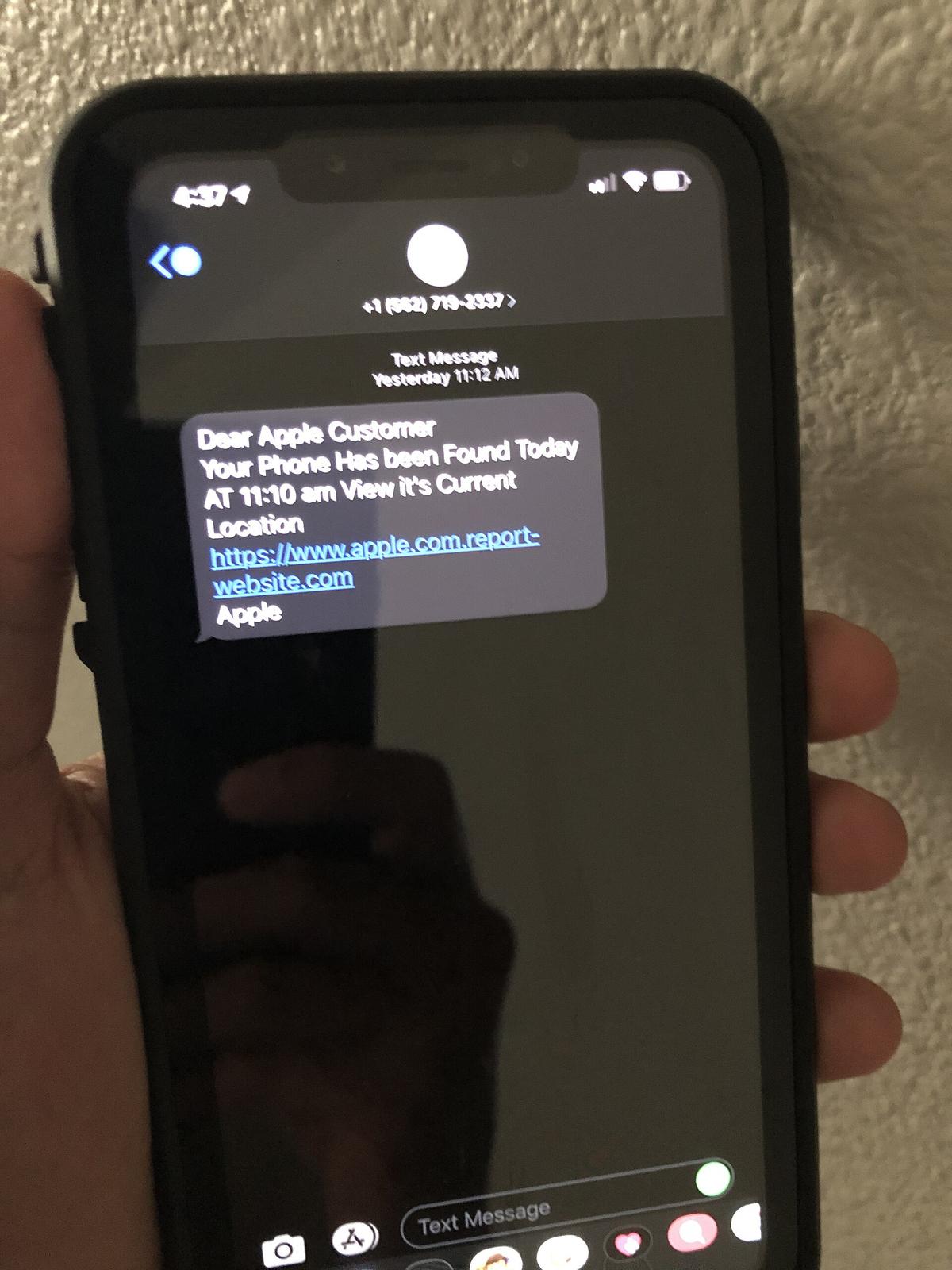
Genuine Singapore agencies and banks do not send unsolicited messages from personal mobile numbers or unknown alphanumeric strings. The sender ID is your first line of defence. A spoofed sender ID scam often displays a name like 'DBS' or 'Singtel' or 'MOH', but the number itself is a random mobile number or a foreign code. Since January 2023, Singapore has operated a sender ID registry for official SMS. Since June 2024, over 100 agencies have consolidated under a single sender ID: gov.sg. Any message claiming to be from a specific ministry or statutory board that does not come from 'gov.sg' is a phishing attempt.
For banks, the rules are stricter. Singapore's telecom regulators have mandated that all SMS from banks and financial institutions must come from five-digit alphanumeric sender IDs, not generic ones. If you see a message from 'DBS' that starts with a plus sign, a '0', or a long number, it is a spoofed SMS. Legitimate bank messages do not ask you to click a link to verify your account. They ask you to log in via the bank's own app or website. If the message asks you to 'update your details' or 'keep your account active', it is an impersonation scam, no matter how official the logo looks.
H2: Examine a Link Without Clicking It to Reveal a Phishing Attempt
How to Preview a Suspicious Link
Never click a link in an SMS or email to verify its destination. On most phones, press and hold the link until a preview appears showing the actual URL. On a desktop, hover your mouse over the link and look at the bottom-left corner of your browser window. The displayed URL is the truth. A message from 'Apple' or 'DBS' that links to a domain like 'dbs-verify.xyz' or 'account-update.top' is a scam. Scammers in Singapore frequently abuse domains ending in .xyz, .top, .cfd, .sbs, and .cyou because these TLDs are cheap and rarely vetted. The Singapore Cyber Emergency Response Team (SingCERT) publishes advisories on these patterns.
Watch for URL Shorteners and How to Check Safely
Be wary of URL shorteners like bit.ly, tinyurl.com, and cutt.ly. A legitimate bank or agency message will never obscure its destination behind a shortener. If you see one, assume it is a phishing link. To check a suspicious link without tapping it, use Google's Safe Browsing transparency report at transparencyreport.google.com/safe-browsing. Paste the full URL into the checker. It will tell you if the site is unsafe. This is a free, immediate check that does not expose your own data.
H2: Use Lateral Reading to Verify Whether an Agency or Bank Sent the Message
Do not judge a message by its polish. Scammers mimic the officialdom halo: the assumption that a government logo, formal language, or a .gov.sg-like URL means something is real. The officialdom halo is a shortcut, and it is precisely the shortcut scammers exploit. Instead, practice lateral reading. When you receive an alarming message, open a new browser tab and search for the organisation's official contact page. Do not use any contact information in the message itself. Look up the official website yourself, then call the number listed there.
If a message claims to be from the Singapore Police Force (SPF) and demands payment for a 'pending warrant', open a new tab and search 'SPF scam alert'. You will find an advisory about the exact template. The same applies for banks: search '[Bank Name] scam email' and you will find official warnings. This is how you verify a claim, not by reading the message again but by leaving it. For government communications, the only trusted channel is the SMS sender ID 'gov.sg' or the official website domain ending in .gov.sg. A .com or .net domain with 'gov' in the name is typosquatting, a deliberate misspelling designed to fool you.
H2: Watch for the Emotional Override and the Urgent Demand for Payment
Scams work because they trigger an emotional override. The message says your account has been compromised, your parcel is held at customs, or your Netflix subscription is about to be cancelled. Your heart rate rises, and you want to fix it now. That urgency is the scam. The SPF Anti-Scam Command advises that no legitimate agency will ever ask you to pay a fine via a link in an SMS, or request that you transfer money to a 'safe account'. The urgent demand for payment is a structural feature of every phishing attempt. It is designed to bypass your rational thinking.
If the message creates fear, anger, or even hope, like a lottery win or a grant, stop. A legitimate organisation will not demand immediate action via SMS, and it will never pressure you with threats of arrest or disconnection. The SPF's own advisory lists generic greetings, poor grammar, and threatening language as red flags. A genuine bank email addresses you by name, not as 'Dear Customer'. A genuine government message will never ask for your banking PIN or a two-factor authentication code over SMS. That code is the last barrier between a scammer and your money. Sharing it, even with a 'bank officer' who calls you, is the verification bypass that ends the game.
H2: Forwarded-as-Received Messages Are the Primary Vector for Scams on WhatsApp
If a message has been forwarded to you, especially on WhatsApp or Telegram, treat it as hostile until proven otherwise. The 'forwarded-as-received' label is not a badge of authenticity. It is a confession that the original sender is unknown to you. Scammers exploit this by crafting messages that impersonate the SPF, the Ministry of Health, or your neighbour's bank, and rely on the social proof of 'a friend sent this to me'. Break that chain of trust. If you receive a forwarded alert about a phishing scam or a 'new virus', do not forward it. Verify it first.
The cost of forwarding a false warning is real: it scares your contacts and makes the next real warning less likely to be believed. If you want to help, report the message to the SPF via the ScamShield app or hotline. Then send your contact the official source, a link to an advisory, not a screenshot of a WhatsApp message. This is the difference between being a good citizen and being part of the problem.
H2: How to Report a Phishing SMS in Singapore to the Police and ScamShield
Report to Your Telecom and the ScamShield App
Reporting a phishing SMS in Singapore is straightforward, and you should do it even if you did not fall for the trick. Forward the suspicious SMS to the shortcode 7726 (which spells SPAM). This number is operated by the SPF and is the official channel for reporting scam messages to your telecom provider. This action helps block the number for other users. Also report the message through the ScamShield app, a free tool that uses an on-device machine learning classifier to identify and block scam calls and SMS. ScamShield also lets you report messages manually.
File a Formal Police Report
For a formal police report, call the anti-scam helpline at 1800-722-6688 or visit the SPF's e-services portal (eservices.police.gov.sg). You will need the sender's number, the content of the message, and the link it contains. Do not click the link before you report it, but if you have, say so. The Anti-Scam Command, formed in March 2022, centralises the investigation of these cases and coordinates the freezing of scam-tainted bank accounts. In 2024 alone, they froze over 19,000 accounts. Your report is not a formality; it is what allows them to act. If you have already transferred money, ask your bank to reverse the transfer immediately. Do this before you file the police report. The bank is the only entity that can freeze the recipient's account.
H2: What to Do If You Have Already Clicked: The Immediate Step-by-Step Response
If you have clicked the link, the first thing to do is not to panic. The second thing is to call your bank's fraud hotline right now. The number is on the back of your bank card, not in the email. Explain that you may have compromised your internet banking credentials and request a freeze on your account. Your bank will deactivate your account and issue a new card. Next, change your passwords, but do it on a different device or after you have disconnected from the network. The scammer may have installed malware that logs keystrokes.
Change the password for the email account associated with your bank, and for your primary email account overall. A common tactic is to use the banking phishing page to collect your email password too, locking you out. After that, call the SPF anti-scam helpline at 1800-722-6688 to report. If you shared a two-factor authentication code, tell the operator that specifically. That means your account is at risk of an account takeover, not just a one-time card charge. If you have lost money, also lodge a report with the Personal Data Protection Commission (PDPC) if the phishing was a data breach of a company. They require organisations to notify affected individuals within three calendar days of a breach involving personal data.
H2: ScamShield Phishing SMS Blocking: What It Can and Cannot Do for You
ScamShield is a free app from the SPF, and its core function is phishing SMS blocking. It runs on your phone and checks incoming messages and calls against a database of known scam numbers, along with an on-device machine-learning classifier that learns to identify new patterns. If it suspects a message is a scam, it blocks it. You can also manually report messages, and the app will provide a reason why it thinks the message is fraudulent. This is a useful tool for the older adult in your family who might otherwise be tricked.
ScamShield is not a silver bullet. It cannot stop all scams, and it cannot protect you if you give away your details through a voice call. The app relies on known or detected patterns; a brand-new scam template might not trigger the blocker. You still need to apply lateral reading to every message. Also, ScamShield only works on Android and iOS. It is not a browser extension for your desktop computer. For that, rely on your email provider's spam filter, which will catch most phishing emails, and on Google Safe Browsing in Chrome, which will warn you if you click a dangerous link. The best use of ScamShield is as a tool for your parents, not as a replacement for your own judgement.
H2: Spotting the 'Officialdom Halo' Failure Mode in Impersonation Scams
The most dangerous phishing emails in Singapore are not the ones with poor grammar. They are the ones that look like they came from an actual agency. This is the officialdom halo failure mode: the assumption that a government logo, a formal signature, and a link that appears to be a .gov.sg domain means the message is authentic. Scammers in Singapore spoof the sender ID of the Police Force, the Ministry of Manpower, and the Immigration & Checkpoints Authority. The result is an impersonation scam where the victim believes a fine is real, or a 'safe account' transfer is the only way to avoid arrest.
The specific tells are subtle. A genuine government email comes from a domain ending in .gov.sg, not from a .com or .org. But scammers use typosquatting, registering domains like 'iras.gov.sg.fake.com' or 'mom-gov.sg', which look close enough at a glance. The only reliable way to catch this is to stop looking at the message and start looking at the source. Open a fresh browser window, type the agency's official URL yourself, and check there for any alert. If the agency has not posted a notice about the 'operation', it is a scam. Use lateral reading as the default behaviour when any message asks for money, credentials, or a two-factor authentication code.
H2: Table: Phishing Message Tells, How to Verify, and What to Do Instead
This table compares the three most common channels scammers use to reach Singaporeans, what the tell is, and the correct action.
| Channel | Common Tell | How to Verify | Correct Action |
|---|---|---|---|
| SMS | Sender ID is a mobile number or unknown alphanumeric | Check against official sender ID registry (gov.sg) | Forward to 7726; delete |
| Mismatched sender domain (e.g., @dbs-secure.co) | Hover over link; search official website | Report to SPF; delete | |
| 'Forwarded' label; urgent demand from 'friend' | Call the friend on their known number | Do not forward; report to 7726 |
Use this table as a quick reference, but the underlying skill is the same: verify the source independently, never use the contact details in the message, and apply lateral reading to every urgent demand for payment.
H2: Why the SPF Anti-Scam Command Wants You to Report Every Phish
The SPF Anti-Scam Command, established in March 2022, is the centralised unit that investigates and disrupts scam operations, including phishing. Their remit includes freezing scam-tainted bank accounts. They froze over 19,000 accounts in 2024. But they cannot act on intelligence they do not have. When you report a phishing SMS to 7726, you are not just alerting your telecom provider. You are feeding the ScamShield database that protects other users. Every report helps refine the machine-learning classifier that powers ScamShield's automated blocking.
The SPF publishes annual statistics in the Annual Scams and Cybercrime Brief. In 2025, phishing accounted for 15.6% of all scam types reported, with 8,652 cases. The most impersonated organisations were banks, specifically DBS, OCBC, and UOB, followed by agencies using the 'gov.sg' sender ID. Knowing these numbers matters because it tells you what the scam looks like. It is not a rare edge case; it is a mass-market operation. Your report makes the statistical picture possible, and it enables the Anti-Scam Command to know where the next wave of spoofed sender IDs is coming from.
H2: The Limitations of Verification Tools and the Need for Your Own Judgement
What the Tools Cannot Catch
No verification tool is a substitute for a sceptical mind. Google Safe Browsing can tell you if a link is on a known malware list, but it will not tell you if a message is a scam. Search engines are fast, but they can be gamed. ScamShield is effective, but it is not perfect: a brand-new scam template may not be in its database. The same applies to email providers' spam filters, which block many of these messages but occasionally let a convincing one through.
Slow Down and Verify Independently
The ultimate responsibility falls on you. You do not need to be a cybersecurity expert to spot a phishing attempt; you just need to slow down. Scammers rely on you being in a hurry, on the emotional override that makes you act before you think. If a message demands that you 'verify your account immediately' because of 'suspicious activity', that is the tell. A legitimate organisation will give you time, will not threaten you with arrest, and will never ask you to purchase gift cards or transfer money to a safe account. When in doubt, do nothing. Call the official number, not the one in the message. You have the right to hang up, to ignore the email, and to verify with an independent source. That is how you spot a phishing SMS or email in Singapore. It is a skill that takes practice, but it is one you already have.
H2: A Final Word on the Scam That Almost Fooled You
Phishing is not a single trick; it is a craft. The scammers study their marks, and they constantly update their templates to bypass filters and exploit the officialdom halo of Singapore agencies. But they have one weakness: they need you to act without thinking. If you take a single habit from this page, let it be this: when a message creates a strong emotional reaction, close it, wait ten minutes, and then ask yourself if the story makes sense.
Does your bank really need you to verify your password by clicking a link? No. Would the police really send a 'warrant for your arrest' via SMS? No. These are the structural features of a scam, and they remain constant no matter how the wording changes. The specific sender IDs, the URLs, and the phone numbers will change tomorrow, but the pattern will not. Learn the pattern, and you will never need to memorise the details.
If you have already clicked, the failure case is not the end. You can still call your bank and the police, and you can still freeze your credit. The scammers hope you will be too embarrassed to tell anyone. Do not be. Reporting it is not a sign of weakness. It shows you are smart enough to know how to protect yourself, and that is a strength.
H2: Phishing SMS and Email FAQ
Q: How fast must I act if I clicked a phishing link?
A: Immediately. Call your bank's fraud hotline first, then the SPF anti-scam helpline at 1800-722-6688. The first hour is critical for freezing accounts and reversing transfers.
Q: What is the difference between a spoofed SMS and a phishing email?
A: A spoofed SMS is a delivery method where the sender ID is faked; a phishing email uses a fake domain. Both are phishing, but SMS spoofing is harder to spot because the sender ID is not a URL.
Q: Can ScamShield block all scam SMS?
A: No. ScamShield blocks messages in its database and uses machine learning to detect new ones, but a brand-new template might slip through. Always verify the sender independently.
Q: Do I need to report a scam if I did not lose money?
A: Yes. Reporting to 7726 helps block the number for others and feeds the ScamShield database. Even without a financial loss, a report helps the Anti-Scam Command see the pattern.
More in this guide
Scams and Online Fraud in Singapore How to Recognise Report and RecoverHow to Protect Elderly Parents from Scams in Singapore with Conversation Starters and Practical Phone SettingsHow to Avoid Online Shopping Scams on Carousell and Other Marketplaces with Safe Payment Verification.